




 Technology28 May 2026
Microsoft Unveils a Sleeker Look for Copilot in Microsoft 365
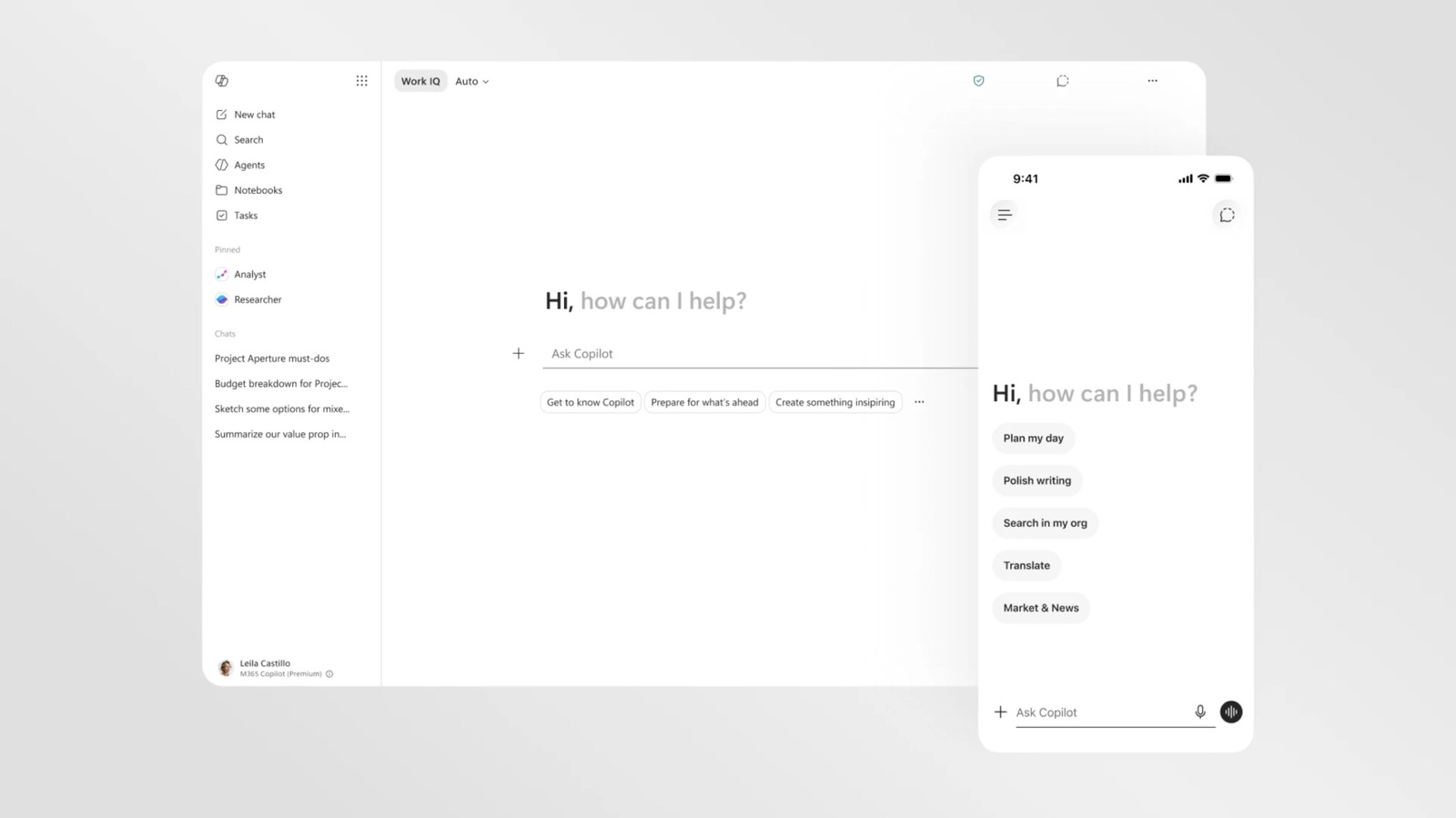
Microsoft introduces a refined design for Copilot, focusing on a sleek, minimalist look across its Microsoft 365 applications.
Microsoft’s New Design for Copilot
Microsoft has revealed a fresh visual design for its AI assistant, Copilot, as part of an ongoing effort to make it more consistent and streamlined across Microsoft 365 applications, including Word, PowerPoint, and Excel. The updated design is geared towards enhancing user experience through a cleaner, more text-focused interface.
A Minimalistic Approach
The most noticeable change in Copilot’s recent update is its stripped-down aesthetic. Gone is the colorful interface that previously characterized the assistant; in its place is a primarily black-and-white design that prioritizes text readability and a less distracting user environment. Microsoft’s shift seems to be aimed at crafting an AI presence that feels more integrated and less imposing.
According to Microsoft, this redesign is not just about aesthetics. It is also a strategic decision to improve the functional experience of users as they interact with Copilot. Prompts are now adaptive, dynamically changing in response to user queries to unveil additional features as needed. This responsive functionality enhances usability and allows users to quickly access needed tools without overwhelming the interface.
Enhanced Functionality Across Applications
With the new design, Copilot’s features are consistently positioned across all Microsoft 365 applications. Now, whenever users access Copilot in apps like Word and Excel, they will find it located in the same side pane, providing uniformity across the suite. This consistent placement simplifies navigation and fosters a smoother workflow for users.
Furthermore, Microsoft has introduced a new "prompt surface" which expands and changes based on user inputs. For example, users can initiate plain text requests, and as they mention specific capabilities of Copilot, the text box will display contextual options for selecting files or visualizing data.
Future of Copilot's Visual Identity
While the redesign marks a significant step forward, it currently applies only to Microsoft’s suite of productivity software. The more colorful version of Copilot, introduced in 2024 for mobile applications, continues to be vibrant and user-friendly. There is speculation that this subtle and sophisticated design might later be extended to other versions of Copilot; however, this will likely depend on the evolving landscape of Microsoft's AI strategy.
In parallel to these design changes, Microsoft is re-evaluating how Copilot and its AI features integrate within Windows 11, making adjustments in response to user feedback and technological advancements. The company is also transitioning to utilizing its in-house AI models after a successful collaboration with OpenAI.
As Microsoft evolves its AI strategy, this new Copilot redesign signals a commitment to achieving a more cohesive and functional user interface while potentially addressing previous concerns from Windows users regarding design and utility.
This iterative approach to Copilot reflects Microsoft’s aim to enhance creativity and productivity through intelligent assistance in the workplace, as it navigates its future in the AI landscape.
Popular news
New York has declared a disaster emergency over rising measles cases, especially among under-immunized populations, with 108 confirmed cases.





Subscribe to
our news
Get the most important updates and top stories in your inbox.